k-Nearest Neighbors (kNN) algorithm – Machine Learning

k-Nearest Neighbors (kNN) is an easy to grasp algorithm (and quite effective one), which:

  • finds a group of k objects in the training set that are closest to the test object, and
  • bases the assignment of a label on the predominance of a particular class in this neighborhood.


There are three key elements of this approach:

  • a set of labeled objects, e.g., a set of stored records (data),
  • a distance or similarity metric to compute distance between objects,
  • and the value of k, the number of nearest neighbors.


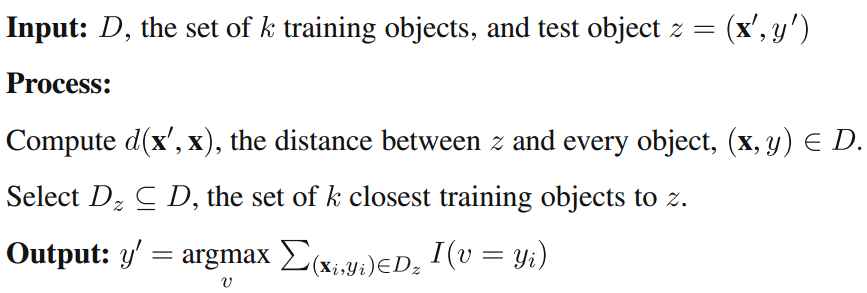
To classify an unlabeled object/item:

  • the distance of this object to the labeled objects is computed,
  • its k-nearest neighbors are identified,
  • and the class labels of these nearest neighbors are then used to determine the class label of the object.


Figure below provides a high-level summary of the nearest-neighbor classification algorithm.
 

knn_example1


knn_example2


Distances are calculated using the Euclidian distance, where the distance between two vectors, xA and xB, with two elements, is given by:

knn_example_euclidian


k-Nearest Neighbors Pros vs. Cons:

  • Pros – High accuracy, insensitive to outliers, no assumptions about data
  • Cons – Computationally expensive, requires a lot of memory
  • Works with – Numeric values, nominal values


Prior to starting coding, here’s what we assume we have: (details in Peter Harrington’s exceptional “Machine Learning in Action”)

  • We have the training data (an existing set of example data)
  • We have labels for all of this data
  • We know what class each piece of the data should fall into
  • When we’re given a new piece of data without a label, we compare that new piece of data to the existing data (every piece of existing data)
  • We then take the most similar pieces of data (the nearest neighbors) and look at their labels
  • We look at the top k most similar pieces of data from our known dataset; this is where the k comes from
  • Lastly, we take a majority vote from the k most similar pieces of data, and the majority is the new class we assign to the data we were asked to classify


I’ll be using Python (v3.3.5) programming language for code examples:

  1. Create a text file named “test_data.txt” that will contain our test data set (x,y coordinates/pairs of points in a 2D space together with labels (3rd column))
        0.2    1.3    top-left
        0.1    1.1    top-left
        0.9    0.1    bottom-right
        1.0    0.2    bottom-right
    
  2. Create a new python file called knn_example.py
  3. Import NumPy (package for scientific computing) and the Operator module (sorting tuples). NumPy requires previous installation from here.
        from numpy import *
        import operator
    
  4. Add a function to prepare the data set (load it from the file and transform into data(matrix) and labels(vector) components)
        def prepareData(fname):
            file = open(fname)
            lines = len(file.readlines())
            data = zeros((lines,2))
            labels = []
            file = open(fname)
            i = 0
            for line in file.readlines():
                line = line.strip()
                list = line.split('\t')
                data[i,:] = list[0:2]
                labels.append(list[-1])
                i += 1
            return data,labels
    
  5. Add a function to classify the data
        def classify(x, data, labels, k):
            size = data.shape[0]
            diff = tile(x, (size,1)) - data
            sqDiff = diff**2
            sqDist = sqDiff.sum(axis=1)
            dist = sqDist**0.5
            sortedDist = dist.argsort()
            count={}
            for i in range(k):
                label = labels[sortedDist[i]]
                count[label] = count.get(label,0) + 1
            sCount = sorted(count.items(), key=operator.itemgetter(1), reverse=True)
            return sCount[0][0]
    
  6. Save the file
  7. Execute (from Python CLI or IDLE):
        >>> import knn_example
        >>> group,labels = knn_example.prepareData('test_data.txt')
        >>> knn_example.classify([1,0], group, labels, 2)


What you should see after executing the above, is following:

    'bottom-right'


Voila, you just created your first classifier (which successfully classified a point with x,y coordinates of 1,0 by assigning it the ‘bottom-right’ label)


Resources:


Machine Learning

Some time ago while reading the journal of Knowledge and Information Systems (KAIS; vol. Dec24, 2007) i came across a paper titled “Top 10 Algorithms in Data Mining”.

This paper was presented at the IEEE International Conference on Data Mining (ICDM; 2006 Hong Kong), and a companion book was published in 2009; edited by the authors of the mentioned paper (Xindong Wu, Vipin Kumar et al).

It was “the paper” that attracted me to the field of Machine Learning, and with this post i’m starting a series of articles related to this exciting area 🙂

Below you’ll find my rough notes (which you still may find useful) as well as my descriptions of some of the Top 10 Algorithms presented in the aforementioned paper.


Basics:

  • Machine Learning – “making sense of the data”
  • Supervised learning – we specify a target variable and the machine learns from our data (by identifying patterns) to eventually get the target variable. (“You know what you are looking for”)
    • Sample tasks:
      • Classification – predicting what class an instance of data should fall into
      • Regression – prediction of a numeric value
  • Unsupervised learning – in case of which you don’t know what you’re looking for, and ask the machine to tell you this instead. (“what do these data have in common?”)


Examples of supervised learning algorithms:

  • k-Nearest Neighbors (kNN) – uses a distance metric to classify items
  • Decision Trees – map observations about an item to conclusions about the item’s target value
  • Naïve Bayes – uses probability distributions for classification
  • Logistic Regression – finds best parameters to properly classify data
  • Support Vector Machines – construct a hyperplane or set of hyperplanes in a high- or infinite-dimensional space
  • AdaBoost – is made up of a collection of classifiers (a meta-algorithm)


Examples of unsupervised learning algorithms:

  • k-Means clustering
  • Apriori algorithm
  • FP-Growth


Classification:

  • In classification, the target variable (“class”) can take:
    • nominal values (true, false, car, plane, human, animal, etc.)
    • infinite number of numeric values (in this case we’re talking about regression)
  • Classification Imbalance – a real-world problem where you have more data from one class than other classes


Overview of the classification algorithms based on their design (Haralambos Marmanis)


Classifiers


Steps in developing a machine learning application:

  • Data collection – using publicly available sources, API’s, RSS feeds, sensors, etc.
  • Input data preparation – algorithm-specific data formatting
  • Input data Analysis – it’s important to “understand the data”
  • Algorithm training – extraction of knowledge or information (this step does not apply to unsupervised learning)
  • Algorithm testing – putting to use information learned in the previous step (evaluating the algorithm)
  • Algorithm usage – solving a problem


Take care.


Resources:

Web Storage – client-side data storage

While investigating the best solution for client-side data storage i came across W3C Web Storage specification, which may be of interest to you as well.


The specification “…defines an API for persistent data storage of key-value pair data in Web clients“. It mentions two different types of storage:

  • Session storage – purpose of which is to remember all data in the current session, but forget it as soon as the browser tab or window gets closed
  • Local storage – which stores the data across multiple browser sessions (persistent storage) and as a result makes it possible to close the page (or window) and still preserve the data within the browser


Both mechanisms use the same Storage interface:

interface Storage {
  readonly attribute unsigned long length;
  DOMString? key(unsigned long index);
  getter DOMString getItem(DOMString key);
  setter creator void setItem(DOMString key, DOMString value);
  deleter void removeItem(DOMString key);
  void clear();
};


The storage facility is similar to traditional HTTP cookie storage but offers some benefits commonly understood as:

  • Storage capacity: Browsers have enabled a minimum of 5Mb of storage inside a web storage object (IE has allowed 10Mb but it varies by storage type and browser).
  • Data transmission: Objects are not sent automatically with each request but must be requested.
  • Client side access: Servers cannot directly write to web storage which provides some additional controls from client-side scripting.
  • Data storage: Array level name/value pairs provides a more flexible data model


Basic operations on both Web Storage mechanisms, look like this:

// session storage
  sessionStorage.setItem('key', 'value');         // set
  var item = sessionStorage.getItem('key');       // retrieve
  var item = sessionStorage.removeItem('key');    // remove
  sessionStorage.clear();                         // clear all
  var no_of_items = sessionStorage.length;        // no. of current items

// local storage
  localStorage.setItem('key', 'value');           // set
  var item = localStorage.getItem('key');         // retrieve
  var item = localStorage.removeItem('key');      // remove
  localStorage.clear();                           // clear all
  var no_of_items = localStorage.length;          // no. of current items


The specification also provides a StorageEvent interface to be fired whenever the storage area changes. It exposes following attributes:

  • storageArea -that tells the type of storage used (Session or Local)
  • key – key which is being changed.
  • oldValue – the old value of the key.
  • newValue – the new value of the key.
  • url – the URL of the page whose key is changed.


Privacy Implications:

  • As has been discussed in the W3C spec and other forums, there are some considerations for privacy in place both within the spec design and implemented in the variable user agent controls present today in common web browsers. Within the spec, there are options for user agents to:
  • Restrict access to local storage to “third party domains” or those domains that do not match the top-level domain (e.g., that sit within i-frames). Sub-domains are considered separate domains unlike cookies.
  • Session and time-based expirations can be set to make data finite vs. permanent.
  • Whitelist and blacklisting features can be used for access controls.


Key facts:

  • Storage per origin: All storage from the same origin will share the same storage space. An origin is a tuple of scheme/host/port (or a globally unique identifier). For example, http://www.example.org and http://abc.example.org are two separate origins, as are http://example.org and https://example.org as well as http://example.org:80 and http://example.org:8000
  • Storage limit: As of now, most browsers that have implemented Web Storage, have placed the storage limit at 5 Mb per domain. You should be able to change this storage limit on a per-domain basis in the browser settings:
    • Chrome: Advanced>Privacy> Content>Cookies
    • Safari: Privacy>Cookies and Other Website Data; “Details”
    • Firefox: Tools> Clear Recent History > Cookies
    • IE: Internet Options> General> Browsing History>Delete> Cookies and Website Data
  • Security considerations: Storage is assigned on a per-origin basis. Someone might use DNS Spoofing to make themselves look like a particular domain when in fact they aren’t, thereby gaining access to the storage area of that domain on a user’s computer. SSL can be used in order to prevent this from happening, so users can be absolutely sure that the site they are viewing is from the same domain name.
  • Where not to use it: If two different users are using different pathnames on a single domain, they can access the storage area of the whole origin and therefore each other’s data. Hence, it is advisable for people on free hosts who have their sites on different directories of the same domain (for example, freehostingspace.org/user1/ and freehostingspace.org/user2/), to not use Web Storage on their pages for the time being.
  • Web Storage is not part of the HTML5 spec: It is a whole specification in itself.


Cookies:

Cookies and Web Storage really serve different purposes. Cookies are primarily for reading server-side, whereas Web Storage can only be read client-side. So the question is, in your app, who needs the data — the client or the server?

  • If it’s your client (your JavaScript), then by all means use Web Storage. You’re wasting bandwidth by sending all the data in the HTTP header each time.
  • If it’s your server, Web Storage isn’t so useful because you’d have to forward the data along somehow (with Ajax or hidden form fields or something). This might be okay if the server only needs a small subset of the total data for each request.


Web Storage vs. Cookies:

  • Web Storage:
    • Pros
      • Support by most modern browsers
      • Stored directly in the browser
      • Same-origin rules apply to local storage data
      • Is not sent with every HTTP request
      • ~5MB storage per domain (that’s 5120KB)
    • Cons
      • Not supported by anything before:
        • IE 8
        • Firefox 3.5
        • Safari 4
        • Chrome 4
        • Opera 10.5
        • iOS 2.0
        • Android 2.0
      • If the server needs stored client information you purposefully have to send it.
  • Cookies:
    • Pros
      • Legacy support (it’s been around forever)
      • Persistent data
      • Expiration dates
    • Cons
      • Each domain stores all its cookies in a single string, which can make parsing data difficult
      • Data is not encrypted
      • Cookies are sent with every HTTP request Limited size (4KB)
      • SQL injection can be performed from a cookie


If you’re interested in Cookies, you can read more here.


Finally, if you’re looking for a client-side data storage solution for AngularJS, you may want to take a look at angular-cache.


Take care!


Resources: