Redis introduction

After reading another great book from Manning – Redis in Action, authored by Dr. Josiah L Carlson (whom you may know from the “Redis DB” mailing list on Google), i thought you may be interested in key takeaways.


Key facts:

  • NoSQL database (key/value store)
  • Stores a mapping of keys to five different types of values (strings, lists, sets, hashes, sorted sets)
  • Supports in-memory and and disk persistence
  • Supports master/slave replication to scale read performance
  • Support for client-side sharding to scale write performance
  • Publish/Subscribe capabilities
  • Support for scripting (equivalent of stored procedures)
  • Partial transaction support
  • Support of bulk operations

+ “Sharding is a method by which you partition your data into different pieces. In this case, you partition your data based on IDs embedded in the keys, based on the hash of keys, or some combination of the two. Through partitioning your data, you can store and fetch the data from multiple machines, which can allow a linear scaling in performance for certain problem domains.”


What happens when my server gets turned off?

  • Redis has two different forms of persistence available for writing in-memory data to disk in a compact format
    • point-in-time dump, either:
      • when certain conditions are met (a number of writes in a given period), or
      • when one of the two dump-to-disk commands is called.
    • append-only file that writes every command that alters data in Redis to disk as it happens. Depending on how careful you want to be with your data, append-only writing can be configured to:
      • never sync,
      • sync once per second, or
      • sync at the completion of every operation


Master/slave replication:

  • A good failover scenario if the server that Redis is running on crashes
  • Slaves connect to the master and receive an initial copy of the full database.
  • As writes are performed on the master, they’re sent to all connected slaves for updating the slave datasets in real time.
  • With continuously updated data on the slaves, clients can then connect to any slave for reads instead of making requests to the master.


Random writes:

  • are always fast, because data is always in memory,
  • queries to Redis don’t need to go through a typical query parser/optimizer


Five data structures available in Redis
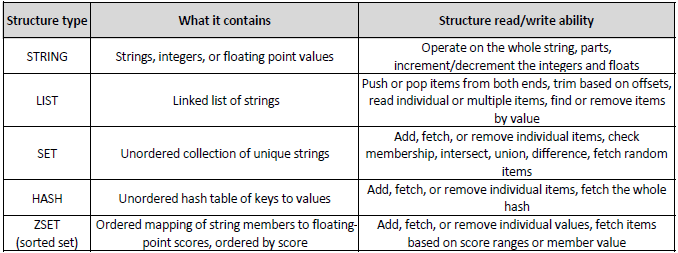
Redis Data Types


Key takeaways:

  • Redis is:
    • fast – operates on in-memory data sets
    • remote – accessible to multiple clients/servers
    • persistent – opportunity to keep data on disk
    • scalable – via slaving and sharding


Spring localized exception handling in REST API

In today’s post i’ll share with you the way we’re handling Internationalization (i18n) and Localization (L10n) in our REST API which is based on Spring MVC (3.2.3.RELEASE).

Our front-end web client is an SPA (Single Page Application) built using AngularJS framework and occasionally it needs to handle Java exceptions messages thrown by the back-end. The way it has been implemented is that it intercepts JSON error responses, wraps them in a pre-defined web page template and displays to the user in a unified and nice way.

“Localization” of back-end related error messages happens …at the back-end level.


After this quick intro let’s get familiar with following two definitions:

  • Internationalization – process of designing software applications so that they can be adapted to various languages and regions without engineering changes.
  • Localization – process of adapting internationalized applications for a specific region or language by adding locale-specific components and translating text.

OK, this is how message bundles look like:

// messages.properties
exception.npe=Unrecognized error: We're sorry.
(...)

and the project view so you get a feel on how maven-managed multi-module project is structured (i use IntelliJ IDEA)

Spring REST API


The ‘resourceBundle’ spring bean is located in ‘spring-locale-context.xml’

<bean id="resourceBundle"
      class="org.springframework.context.support.ReloadableResourceBundleMessageSource"
      p:basename="classpath:locale/messages"
      p:cacheSeconds="5"
      p:defaultEncoding="UTF-8" />


As you can see i’m using ‘ReloadableResourceBundleMessageSource‘ which i prefer over ‘ResourceBundleMessageSource‘ – here’s why (according to Spring framework spec.)

  • ResourceBundleMessageSource – MessageSource implementation that accesses resource bundles using specified basenames. This class relies on the underlying JDK’s ResourceBundle implementation, in combination with the JDK’s standard message parsing provided by MessageFormat. This MessageSource caches both the accessed ResourceBundle instances and the generated MessageFormats for each message. It also implements rendering of no-arg messages without MessageFormat, as supported by the AbstractMessageSource base class. The caching provided by this MessageSource is significantly faster than the built-in caching of the java.util.ResourceBundle class. Unfortunately, java.util.ResourceBundle caches loaded bundles forever: Reloading a bundle during VM execution is not possible. As this MessageSource relies on ResourceBundle, it faces the same limitation. Consider ReloadableResourceBundleMessageSource for an alternative that is capable of refreshing the underlying bundle files.
  • ReloadableResourceBundleMessageSource – Spring-specific MessageSource implementation that accesses resource bundles using specified basenames, participating in the Spring ApplicationContext‘s resource loading. In contrast to the JDK-based ResourceBundleMessageSource, this class uses Properties instances as its custom data structure for messages, loading them via a PropertiesPersister strategy from Spring Resource handles. This strategy is not only capable of reloading files based on timestamp changes, but also of loading properties files with a specific character encoding. It will detect XML property files as well. In contrast to ResourceBundleMessageSource, this class supports reloading of properties files through the "cacheSeconds" setting, and also through programmatically clearing the properties cache. Since application servers typically cache all files loaded from the classpath, it is necessary to store resources somewhere else (for example, in the “WEB-INF” directory of a web app). Otherwise changes of files in the classpath will not be reflected in the application. This MessageSource implementation is usually slightly faster than ResourceBundleMessageSource, which builds on ResourceBundle – in the default mode, i.e. when caching forever. With “cacheSeconds” set to 1, message lookup takes about twice as long – with the benefit that changes in individual properties files are detected with a maximum delay of 1 second. Higher “cacheSeconds” values usually do not make a significant difference.


Now, let’s make our resourceBundle accessible to exception handlers:

public class AbstractExceptionHandler {

    @Autowired
    private ReloadableResourceBundleMessageSource resourceBundle;

    public ReloadableResourceBundleMessageSource getResourceBundle() {
        return resourceBundle;
    }

    public void setResourceBundle(ReloadableResourceBundleMessageSource resourceBundle) {
        this.resourceBundle = resourceBundle;
    }

}


Create an MVC REST Controller:

@Controller
@RequestMapping(value = "/users")
public class UserController {

    @Autowired
    private UserService service;

    /**
     * Handling GET request to retrieve all {@link User}'s
     * @return Collection<User> a collection of users
     */
    @RequestMapping(method = RequestMethod.GET)
    public @ResponseBody
    Collection<User> getUsers() {
        return service.findAllUsers();
    };

}


…and an exception handler that will intercept (NPE in this case) exceptions thrown by the controller:

@ControllerAdvice
public class BusinessExceptionHandler extends AbstractExceptionHandler {

    @ExceptionHandler(NullPointerException.class)
    @ResponseStatus(value = HttpStatus.INTERNAL_SERVER_ERROR)
    @ResponseBody DefaultErrorMessage handleNullPointerException() {

        String error = getResourceBundle().getMessage("exception.npe", null, Locale.getDefault());

        return new DefaultErrorMessage("RS00230", "SYSTEM_ERROR", error);

    }

}


As you can see above, I did two things:

  • fed the error string with exception.npe message that comes from the message bundle and used Locale.getDefault()
  • and defined a custom DefaultErrorMessage which basically is a POJO send over to the client as a JSON response which looks like this:
{
  "code" : "RS00230",
  "status" : "SYSTEM_ERROR",
  "errors" : [ "Unrecognized error: We're sorry." ]
}


Hope you find this brief example helpful. Cheers!


Resources:

AngularJS custom HTTP headers in resource service

Recently i had to make an HTTP call from the browser (client-side) using JavaScript / AngularJS to a REST API (server-side) and retrieve data. Since the authentication mechanism of the API required a security token to be passed over with the request, i studied AngularJS specs on how to do it best. Basically, there are two ways to do it, either as a:

  1. query parameter, or
  2. custom HTTP header


Because i didn’t wanted the security token to appear anywhere in the logs or debugging console (like on the picture below, in case of making use of option 1 just mentioned, ie. query parameter), i decided on passing the token as a custom (there’s no standard header for passing tokens) HTTP header.

AngularJS query API token


Since i use Yeoman (app workflow/scaffolding tool) i noticed that through a standard angular-template used for generating an application scaffolding, you’re getting dependency on angular framework in version 1.0.7 (last stable version as of writing this post). Although this is what you would generally expect (stable version, not a snapshot), the problem is that angular documentation for $resource service (which is what i prefer to use over $http service), does not mention the possibility of sending HTTP headers (regarding $http – i think of it as a solution for rather “general purpose AJAX calls”).


One way to set HTTP headers is by accessing $httpProvider.defaults.headers configuration object, like this:

$httpProvider.defaults.headers.get['API-Token'] = 'vy4eUCqpQmGoeWsnHKwCQw'

(more documentation about that you’ll find here), but this way you’re modifying $httpProvider globally which may not be what you exactly want.


Google search came with help and i found issue 736, which acknowledges that “$resource should support custom http headers”, but it is with the (unstable) release 1.1.3 where this feature is supported for sure (maybe earlier “unstable” versions do support it too, haven’t checked that actually, but definitely none of the stable versions do, as of today).


So, what is it that you have to do in order to introduce an unstable version of AngularJS into your project managed by Bower?

bower install angular-unstable
bower install angular-resource-unstable

(dependency on angular-resource.js is required in order for it to work).


Now, the only other thing left to do is to update your index.html file accordingly (to make use of proper version of libraries) :

<script src="bower_components/angular-unstable/angular.js"></script>
<script src="bower_components/angular-resource-unstable/angular-resource.js"></script>


…and you can start adding custom HTTP headers in your code:

angular.module('usersService', ['ngResource'])
    .factory('User', function($resource, api-token) {
        var User = $resource('http://api.test.com\\:8080/1.0/users', { }, {
            query: {
                method: 'GET',
                isArray: true,
                headers: { 'API-Token': api-token }
            }
        });
        return User
    });


Hope this short post will save some of your time 🙂 Cheers!


Resources: